
RequisiteAI — LinkedIn Hiring Posts
Recruiters paste a job requirement; RequisiteAI drafts the post and a branded hiring poster.
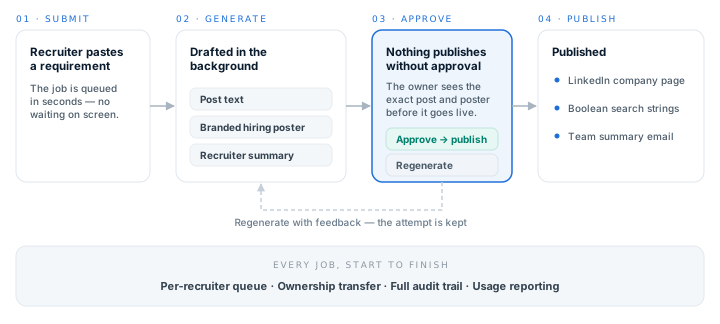
What RequisiteAI does
A recruiter receives a job requirement and wants it on LinkedIn within the hour, with a poster that looks like the firm made it. RequisiteAI is the application that closes that gap. The recruiter pastes the requirement and goes back to their queue; the post text, a branded hiring poster and a short recruiter summary are drafted in the background.
Nothing is published automatically. The draft waits in the recruiter's queue until they have read it, and the person who submitted the requirement is the person who approves it. On approval the post goes to the company LinkedIn page, boolean search strings are generated for LinkedIn, Dice and Monster, and a summary email reaches the recruiting team.
The approval gate
The gate is the point of the product. A draft sits in the queue as a record rather than as a paused process, so it can wait as long as the recruiter needs it to, and approval is the only route to publication. Several recruiters work their own queues at the same time without blocking one another.
If a draft is not right, the recruiter writes what to change and regenerates. The earlier attempt is kept and stays viewable, so nothing is lost by trying again — and an admin can hand a job to someone else when its owner is away.
How a post gets made
Five stages, from the requirement landing in a recruiter's inbox to the post appearing on the company page.
- 01SubmitA recruiter pastes the job requirement and submits it. The job is queued in seconds; nobody waits on a screen while it generates.
- 02GeneratePost text, a branded hiring poster and a short recruiter summary are drafted in the background, with the queue showing the stage each job has reached.
- 03ReviewThe recruiter opens the job and sees the poster at full size and the post text exactly as LinkedIn will render it. The text can be edited in place.
- 04Approve or regenerateApproval is what publishes. Otherwise the recruiter writes what to change and regenerates, and the earlier attempt is kept.
- 05PublishThe post goes to the company LinkedIn page, boolean search strings are generated for LinkedIn, Dice and Monster, and a summary email goes to the recruiting team.
For recruiters
The queue belongs to the recruiter — what they submitted, what is generating, and what is waiting on them.
- Submit a requirement and move straight on to the next one
- See the exact post text and poster before anything publishes
- Edit the post text in place, with LinkedIn's character limit enforced as you type
- Regenerate with written feedback rather than accepting a flawed draft
- Review and approve from a phone between meetings
For recruiting leads
Everything in flight in one view, without having to ask anyone where a post has got to.
- Every job's stage, owner and age in a single view
- Reassign a job to another recruiter in one interaction when someone is away
- Per-recruiter volume over any period — submitted, published, declined, approval rate, average attempts
- An audit record of who submitted and who approved, and CSV export for anything further
- Run limits, so generation volume stays predictable
Branding and configuration
Posters carry the firm's own identity, set up once by an admin and checked before they can be saved.
- Upload a logo and position it against a sample poster, with the composite previewed before saving
- Contrast and logo fit checked at save, so a poster cannot ship with the logo across the headline
- A test generation that produces a full poster without creating a job
- Company page, recruiting team recipients and run limits all set per deployment
How it is deployed
Each customer receives a separate deployment, with its own database, its own storage and its own credentials. There is no shared tenancy: one firm's requirements, posters and reporting never sit alongside another's.
A new deployment is configured entirely through its settings — no workflow edits and no code changes — and Tek Labs deploys and maintains it.